-
Prepare
Prepare your presentation by reading the guidelines.
-
Download
Download the template you need.
➤ Go to official oral presentation template (.pptx)
➤ Go to official poster presentation template (.pptx)
Key dates
-
Abstract submissions open
25 May 2024
-
Abstract submissions close
31 July 2025
-
Registration open
21 May 2025
-
Author notifications
November 2025
-
Full program available
November 2025
-
Registration deadline free communication / poster presenters
15 December 2025
-
Early bird closes
30 January 202613 February 2026CLOSED
-
Standard closes
6 May 2026
-
Conference dates
7-9 May 2026
Oral abstract presentation guidelines
WCNA 2026 is being held as in-person conference. Therefore, speakers are only to give in-person presentations. This information is for all oral presentations. These guidelines include instructions on how to prepare your presentation.
It is a requirement that all accepted presenters in the program register, pay and attend WCNA 2026.
1. General Information
• All presenters are required to register as scientific attendees.
• Please refer to your confirmation email to review your allocated presentation and Q&A time.
• Rehearse your presentation beforehand. Session moderators will hold you to your allotted time.
• Dress Code: attire is casual.
• If you are unable to present and need to send a replacement author, please inform the WCNA Program Manager immediately. The replacement author must be approved by the WCNA Scientific Committee.
2. Slide requirements
• At the start of your presentation, show a disclosure slide and verbally disclose whether you have any financial support or conflicts of interest to report. This is required for CE purposes.
• When presenting patient data and health information (including photos), all presenters must be compliant with informed consent regarding human subjects and all applicable HIPAA regulations.
• You must secure any third-party permissions necessary for content that is not your own, original work.
• If data or abstract has been previously published, authors must indicate the date and publication on at least one slide.
• The last slide in your presentation may include acknowledgments. Presenters should not use presentation time to acknowledge co-authors and collaborators.
• Remember that talks are tweetable and shareable by default. Speakers can ask that specific details not be shared and can opt out by informing the audience of their preference.
• Note: Slides will automatically be formatted on site to allow the display of open captions below the presentation.
3. Presentation template
• A 16:9 widescreen format will be used for projection of slides. It is recommended that all oral presenters use the official presentation template when preparing their presentation. This template is already in the 16:9 ratio for you.
• We run presenter mode in the meeting rooms. This allows attendees to see your slides on the monitor, but only you can view the associated notes at the lectern. Presenter mode will also be available for testing in the speakers’ preparation lounge.
4. PowerPoint files
All users of Macintosh hardware need to ensure before they leave home that the files are compatible with PC hardware. It is expected that presenters will use Microsoft.
Other compatible software includes:
• Windows XP
• Office XP (Word, PowerPoint, Excel, Access, Outlook)
• Windows Media Player
• Quick Time
• WinZip
• Adobe Acrobat
• Flash Player
Please let us know immediately if you use a Mac system.
5. Movies or sound
If you have movies or sound files in the PowerPoint presentation, please embed them and test that they work correctly in presentation mode. Videos and photos may need to be resized so they do not appear stretched. Animations should be checked to ensure the elements line up correctly.
Start early to leave time to resize slide content.
• To ensure a complete and effective presentation every time here’s what to do:
• Create a folder for your presentation.
• Place or copy every file that is used in the presentation in this folder. This will include all pictures, movies, sounds or any files that are used in the presentation.
• Now re-create any links so that they access this presentation folder (Insert, Movies and Sounds, From File). Remember to resave the presentation.
• Another advantage of this approach is that you have access to the original files such as video clips etc. in the event of PowerPoint problems.
• It is good practice to keep a second copy in your (hand)luggage.
6. Loading your presentation
All speakers are required to pre-load their presentations at the speaker preparation lounge at least 3 hours prior to their session commencing. All presentations will be networked to the presentation rooms; therefore, you need to ensure your presentation is loaded prior to your speaking time. It will not be possible to use your own laptop or USB for your presentation.
7. Session information
Your presentation will be given live, in-person. Questions from the audience will be moderated by the session moderator and distributed verbally to speakers. You are required to be available for the duration of your session and to participate in the live Q&A.
8. Speaker preparation lounge
Please check in at the speaker preparation lounge well in advance of your presentation (at least 3 hours prior to your session commencement). Your presentation will be checked, then loaded onto the network, and will be available in your assigned session room.
9. On your day of presentation
• Follow the below checklist to ensure you are ready for your presentation!
• Make sure you have loaded your presentation in the speaker’s preparation room.
• Be in your assigned session room at least 10 minutes prior to your session commencing. It is important that all speakers stay on time. Moderators have been instructed to stop you from speaking if you go over the allotted time.
• Introduce yourself to the session moderators.
• Ensure that you are seated at the front of the room (front row near lectern or at head table depending on number of speakers in your session)
• At the lectern, there will be a monitor where you can follow your presentation.
• Speak directly into the microphone, and do not handle the microphone while speaking.
10. Free communications
The Local Organising Committee of the WCNA 2026 will judge the presentations and allocate points for:
• Presenting
• Content
• Audience interaction
To be eligible for the best free paper award, the presenter is required to provide an oral presentation at the free paper session.
Free paper presentations are informal and an opportunity to share findings with colleagues. The best free paper will receive an award that will be announced at the Closing Ceremony. The winner will receive a certificate and a photo will be taken.
Poster presentation guidelines
WCNA 2026 is being held as in-person conference. Therefore, poster presenters are only to give in-person presentations. All posters will be displayed in a traditional printed format. There will not be any virtual/digital poster displays. This information is for all poster presentations. These guidelines include instructions on how to prepare your poster.
Poster listing
The poster listing is now available. Please make sure to check the poster listing to confirm your allocated poster tour to ensure you have the most up‑to‑date information.
1. General Information
- All presenters are required to register as scientific attendees.
- All posters will be displayed in a traditional printed format. There will not be any virtual/digital poster displays.
- Poster presentations are 3 minutes in length
- Dress Code: attire is casual.
2. Poster Information
- All presenters are responsible for printing and preparing their posters prior to their arrival at the conference. Please note, the WCNA Conference Secretariat will not be able to print your posters onsite.
- Your poster space allocation is A0 size, portrait (1189mm high and 841mm wide – maximum size). Please note clear identification is absolutely essential.
- We recommend that you bring double-sided tape to mount your materials.
- You may consider having a synopsis of your research eg. A4 or US sized letter sized copies of the poster, available at your poster or a business card if people wish to contact you after the congress. These are to be placed in pockets attached to the poster (presenters’ responsibility to supply).
3. Presentation template
It is recommended that all poster presenters use the official poster presentation template when preparing their poster, however this is not mandatory. This template is already in the A0, portrait style.
4. Poster format
- The official poster size is A0, portrait (1189mm high and 841mm wide – maximum size).
- Each poster is permitted 1 x A0 display.
- You are required to prepare your poster in the correct sizing i.e., it is not suitable to prepare multiple smaller size sheets to display.
5. Poster upload portal
Poster presenters are required to submit their poster presentation by Sunday 1 March 2026.
The poster upload portal is now closed.
6. Poster display number
The poster listing is now available. Please make sure to check the poster listing to confirm your allocated poster tour to ensure you have the most up‑to‑date information.
There is no requirement to put a poster number on your display; it is only needed onsite to identify the correct display board.
7. Poster hanging times
Posters are required to be hung by no later than 1230 hours on 7 May 2026 and removed by no later than 1530 hours on 9 May 2026
Posters not removed by this time, will be taken down and stored at the registration desk for collection. All posters not collected by 1730 hours on 9 May 2026 will be discarded.
We recommend that you bring double-sided tape to mount your materials.
8. Poster sessions
The poster sessions are scheduled for the first day of the WCNA. There will be three poster sessions held between 13:30 and 15:00, scheduled as follows:
Poster Session 1: 13:30–14:00
Poster Session 2: 14:00–14:30
Poster Session 3: 14:30–15:00
The poster listing is now available. Please make sure to check the poster listing to confirm your allocated poster tour to ensure you have the most up‑to‑date information.
To be eligible for an award, the author is required to provide an oral presentation to judges during the poster presentation sessions. Each primary author will give a 3-minute presentation, to highlight the key aspects of their poster, followed by a short discussion and questions from the judges.
Each poster will be included in a guided poster tour led by members of the Education and Practice Committee.
Please meet in the registration area at least five minutes prior to the start of your scheduled poster session. Your poster tour leader will meet you at this location and guide you through the session.
The top 3 posters will receive an award that will be announced at the Closing Ceremony. Each winner will receive a certificate, and a photo will be taken.
While optional, authors are encouraged to provide informative handouts including their contact information with those viewing their posters.
Chairperson guidelines
WCNA 2026 is being held as in-person conference. Therefore, poster presenters are only to give in-person presentations. All posters will be displayed in a traditional printed format. There will not be any virtual/digital poster displays. This information is for all poster presentations. These guidelines include instructions on how to prepare your poster.
It is a requirement that all accepted presenters in the program register, pay and attend WCNA 2026.
The registration deadline is: Monday 15 December 2025
1. What can I expect on the day?
- Each room is clearly marked at the entrance with digital door sign that will identify the session – be sure to match your room number with your allocated session.
- The room will be set in theatre style – please ensure all attending are seated and not standing in front or to the sides of the room entrance, this is a venue fire hazard prevention requirement.
- At the front of the room a low-level stage is included, lectern and projection screen above, please welcome speakers and use the lectern mic when they speak.
- Chairpersons are encouraged to speak from the lectern and remain seated in a reserved seat at the front of the room. Please ensure speakers to sit in a reserved seat to minimise time to the stage.
- Welcome all speakers to the stage at the end for the Q&A
2. In preparation for the session
- Please identify the speakers from your session – should you have any queries regarding their presentation, pronunciation of their name, ideal questions to ask – please connect with speakers prior to the session.
- Arrive approximately 15 mins before the session commences so you can meet and greet speakers – if you do not have all speakers in your allocated room 5 minutes prior to the session commencing, please advise the event organisers, there will always be a team member in a room or foyer near your room if not in your room.
- Review the topics of the presentations prior to structure at least 1 question per speaker to have ready should there not be any audience questions
- Do not include questions at the end of your session if the session end time has been reached by the presentations, remind speakers of their remaining talk time from your seat using the timer cards provided. Should they continue to talk, politely interrupt them to wrap the presentation. It is essential to remain on time with a full program across each day.
- Please keep your welcome and introduction of the speakers to a minimum. No more than 1-2 sentences in the welcome and introducing the speaker. This will ensure maximum time is allocated to the presentations and Q&A
- Conclude the session with a thank you to all speakers and encourage the audience to connect directly with the speakers over the various catering breaks.
3. What if I need help?
In all session rooms, there will be an AV technician at the back of the room and Conference Organisers will be available at the registration area.
4. What if I am unable to attend?
Should you have unexpected schedule change or ill on the day, please contact hello@wcna.com no later than 2 hours before your expected session is to commence.
5. What is expected of me as chairperson?
The chairperson is expected to manage the session, and this includes but is not limited to the following actions:
- Introduce the session
- Introduce the speakers (biographies are not necessary due to time constraints, full name and presentation title is sufficient)
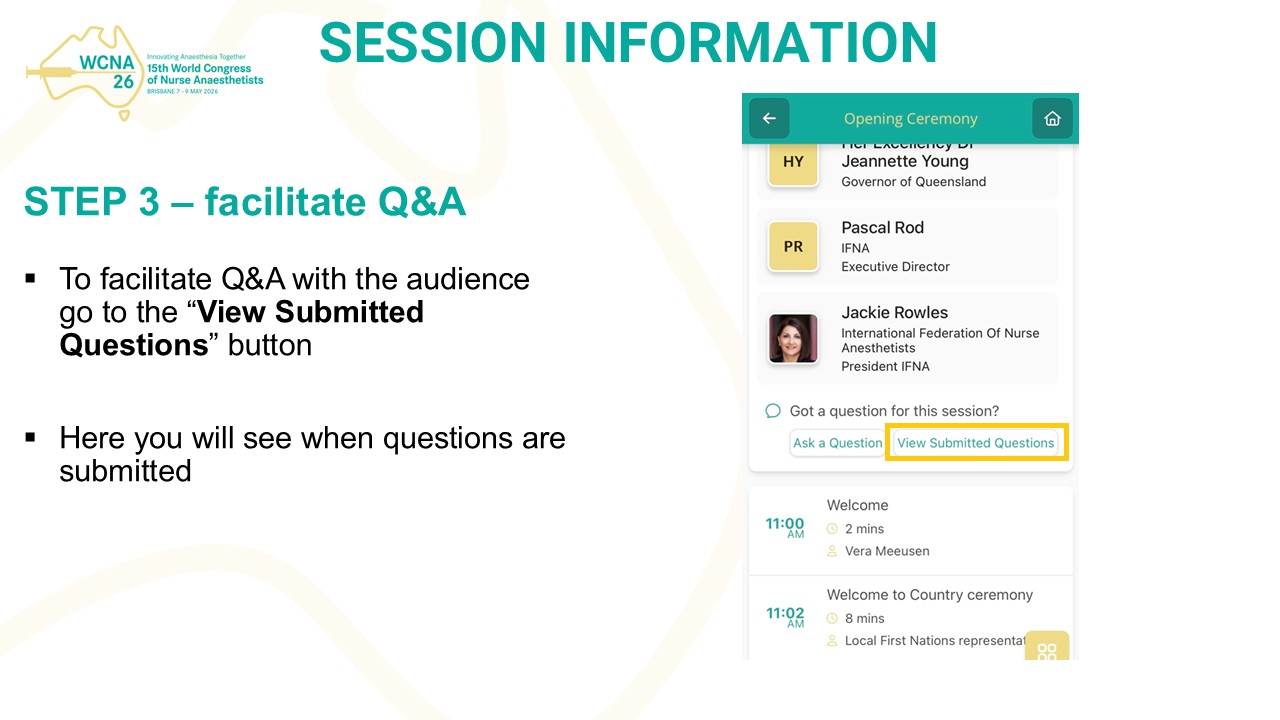
- Facilitate Q&A
- Ensure the session runs to time and does not exceed the allocated time
- Close the session and thank speakers/audience
- Discuss with your co-chairperson how you will divide the role within the session. For example, one may choose to open/close session while the other may choose to facilitate Q&A.
6. How will Q&A work?
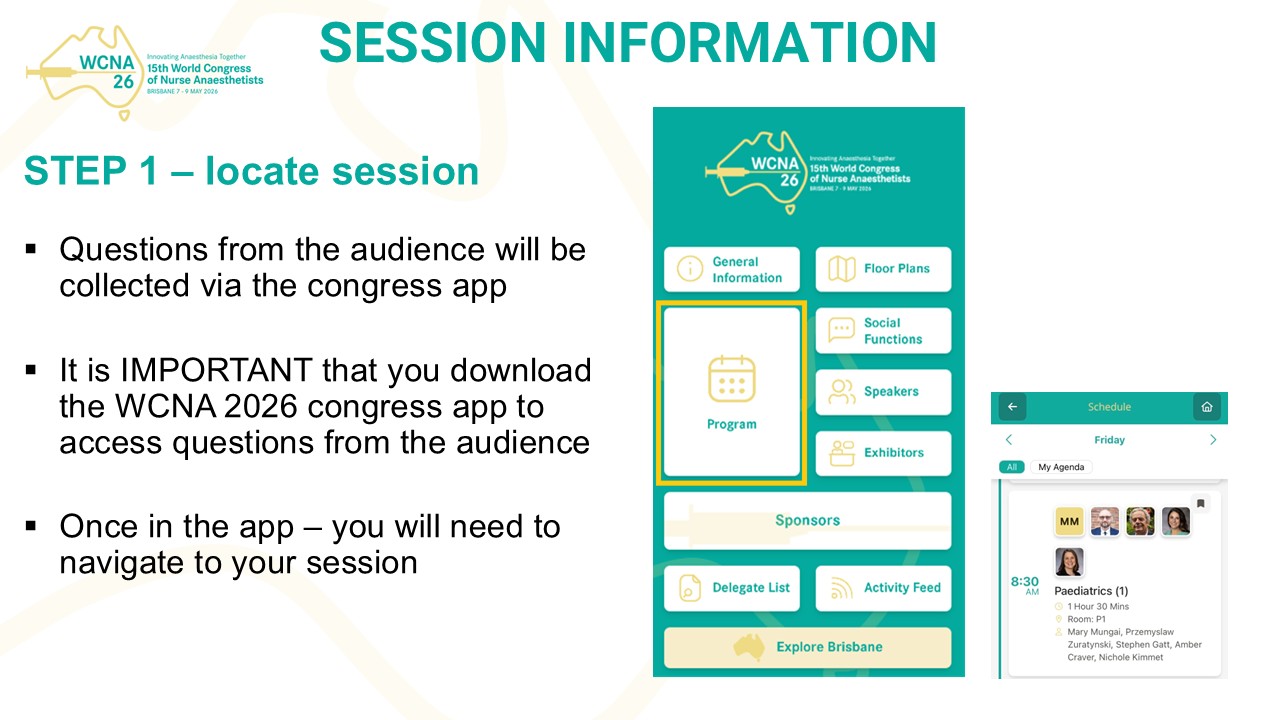
Questions from the audience will be collected via the congress app.
It is IMPORTANT that all chairpersons download the congress app to effectively manage their assigned session.
It is the chairperson’s responsibility to ensure that they are checking the congress app for any questions asked.
Chairpersons will need to access the congress app from their own device to assist with their role during the session.
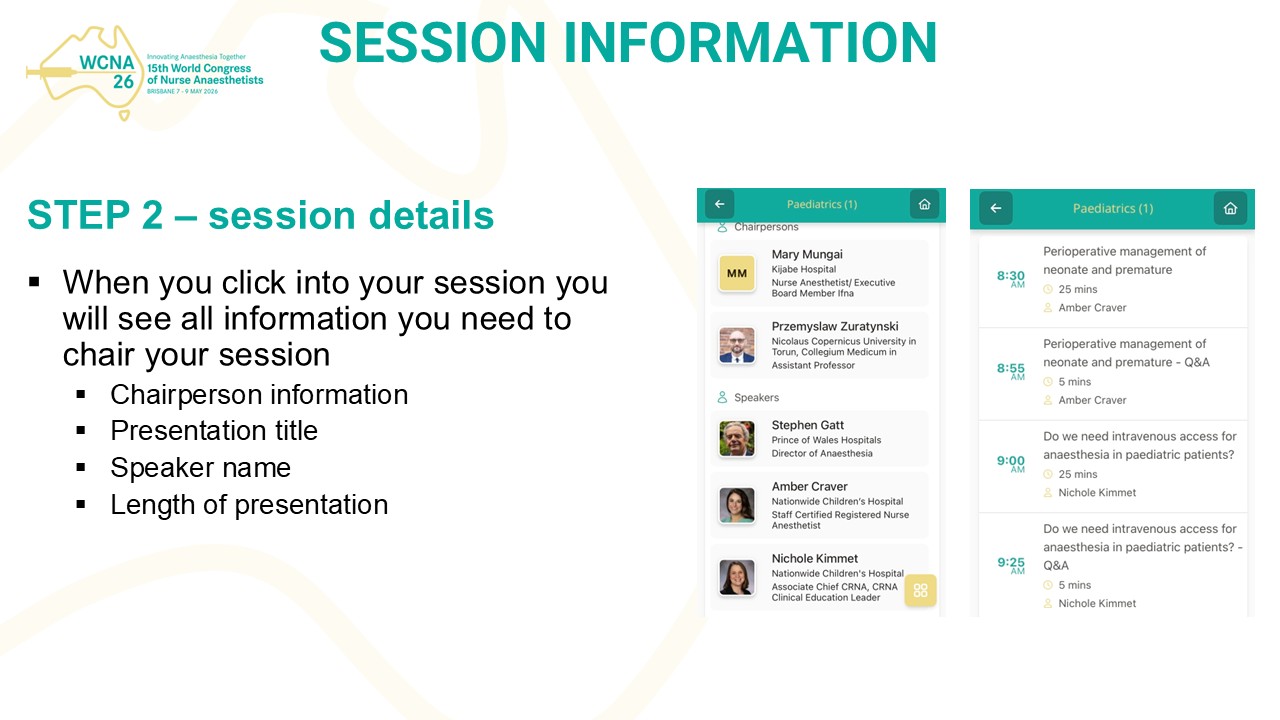
The app will show the following information:
- Session information including the title of the session, speaker names, presentation titles and presentation lengths
- Any questions submitted through the virtual platform
You will need to connect your device to the venue wifi and updates to your session will automatically be made through the app – it will be important to refresh this regularly.
Important note: if an audience member calls out a question whilst seated, you must repeat the question so everyone can hear. Chairpersons / speakers must always speak into the microphone.